
A chat window is good at answers. It's bad at work.
You know where it breaks. You explain your business again in every conversation. Last week's context is gone. Anything with more than two steps, you drive by hand: copy this over there, paste that back, ask for the next piece. And the minute you close the tab, nothing is happening.
askTheodor is built for the other kind of job: the one that has steps, repeats, or has to happen while you're somewhere else. This is the one-page tour: what it is, how a job moves through it, and where it stops being the right tool. If you'd rather skim a picture, the whole thing is on one infographic at the end.
The short version
askTheodor is a desktop app for macOS and Windows. You build a small team of AI workers, group them into companies, and let Theodor, a chief of staff who comes built in, coordinate them. Your workspace is a database on your own machine. You bring your own AI provider keys, or run a local model. Anything sensitive or irreversible waits at a gate you control.
That's the whole idea. The rest is how it holds together.
How a job moves through it
1. You brief Theodor. In plain words, in a chat. Theodor sits above every company, so he can see all your workers, what's been handed out and what's still open. You don't have to know who should take a job. The most useful sentence in the app is a simple one: "Turn this into a plan, but stop for my approval before anything goes out."
2. He plans and delegates. For anything bigger than one task, Theodor drafts a Plan: tasks wired together by dependency (research first, then drafting, then review), each assigned to the right worker. The plan starts in pending approval. Nothing runs until you say go.
3. Workers do the work. Each worker has its own model, its own memory and an allowlist of the tools it may use: web search, a real browser, files, documents, and connectors to the services you already pay for. A scheduler runs each task as its dependencies clear, retries failures with a growing wait, and writes a final report when the plan is done. It keeps advancing while you're away from the keyboard, and on an always-on machine it can do that around the clock.
4. You approve what leaves. Anything sensitive or irreversible, such as sending an email, posting publicly, deleting something or running a flagged command, pauses at the approval gate and shows you exactly what it wants to do. Emails are drafted, not sent. You decide.
What's in the box
Workers, not assistants. A worker is a character sheet: a name and a role, a model of its own (different workers can run on different models), a soul and skills that shape how it behaves, a tool allowlist, and four personality dials: concise to thorough, cautious to decisive, formal to casual, diplomatic to blunt. Workers earn experience as they're used and climb from level 1 to 200.
Companies. The box around a team and everything it owns: workers, tasks, goals, routines and a Library. Make one per client, or one per function. Each Company carries a small operating system of house rules (a brand kit, compliance presets like GDPR and HIPAA, preferred vendors) that's folded into every worker's instructions.
A Library your workers actually use. Documents, notes, links and files that are yours. Before a worker answers, askTheodor fetches the most relevant pieces and hands them over with your question, so the answer is grounded in your material. The technique is called RAG, and the practical effect is fewer invented facts. One caution: it quotes what's on the shelf with full confidence, so a stale price list is quoted as confidently as a fresh one. Keep it current.
Plans and Routines. A Plan is a one-off project. A Routine is a standing job (the same worker, the same prompt) that fires on a schedule, when a file lands in a folder, or when another tool calls a webhook. "Every weekday at 8, digest the overnight inbox" is a routine.
Real tools. Beyond text: web search, a real browser, reading and writing files, making documents, and a shell, but only if you allow it. More come through MCP servers and one-click connectors for the services you already use.
Guardrails. Budgets cap spending per worker, per company or globally, with an alert threshold and a hard stop that refuses the next model call once the cap is hit. Per-tool limits stop a worker from looping. And one Autonomy switch pauses every plan, routine and background job at once.
Where it runs
On your Mac or PC first. For work that shouldn't depend on your laptop being awake, you can pair an always-on machine, a small server, so Plans and Routines keep running there around the clock. Paired machines talk over signed requests, and you grant each one only the scopes it needs.
There's also a kiosk mode, which turns a touch screen into a multilingual receptionist for a lobby or an entrance hall. Kiosks and remote runners are add-ons to the base license.
Where it stops being the right tool
- A one-off question. A quick rewrite, or an answer you'll finish in two exchanges, is faster in a chat window. Configuring a worker for that is overhead. askTheodor earns its keep on work that repeats, has structure, or has to happen while you're elsewhere.
- Anything that must never leave your machine, if you use a cloud model. Local-first means your workspace is stored locally and nothing is uploaded to us. But if you connect a cloud provider, your prompts go to that provider. That's how the model thinks. If nothing may leave, run a local model through Ollama or LM Studio.
- Long chains without a checkpoint. A confidently wrong early task hands wrong material to everything downstream, and retries only catch failures, not wrong answers. For a plan longer than about five tasks, put a review step in the middle.
- Zero setup. You connect at least one AI provider (a cloud key, or a local runner) and pay those providers directly. Every cent shows up in the Cost screen.
Where to start
- Download askTheodor from the home page and start the 7-day free trial. Every feature is unlocked.
- Connect one provider under Settings → Providers. A cloud key is the fastest way to good results; Ollama is the way to keep everything local.
- Open a chat with Theodor and tell him what your business actually does. Then ask him the two questions worth asking every day: what's overdue or blocked right now, and what you should focus on first.
- Give one worker one real task, and judge it on that.
Want the detail on any piece? The docs start with What is askTheodor? and Your first hour, and the Academy has a hands-on lesson for each step, from meeting Theodor to approvals.
The whole thing, on one page
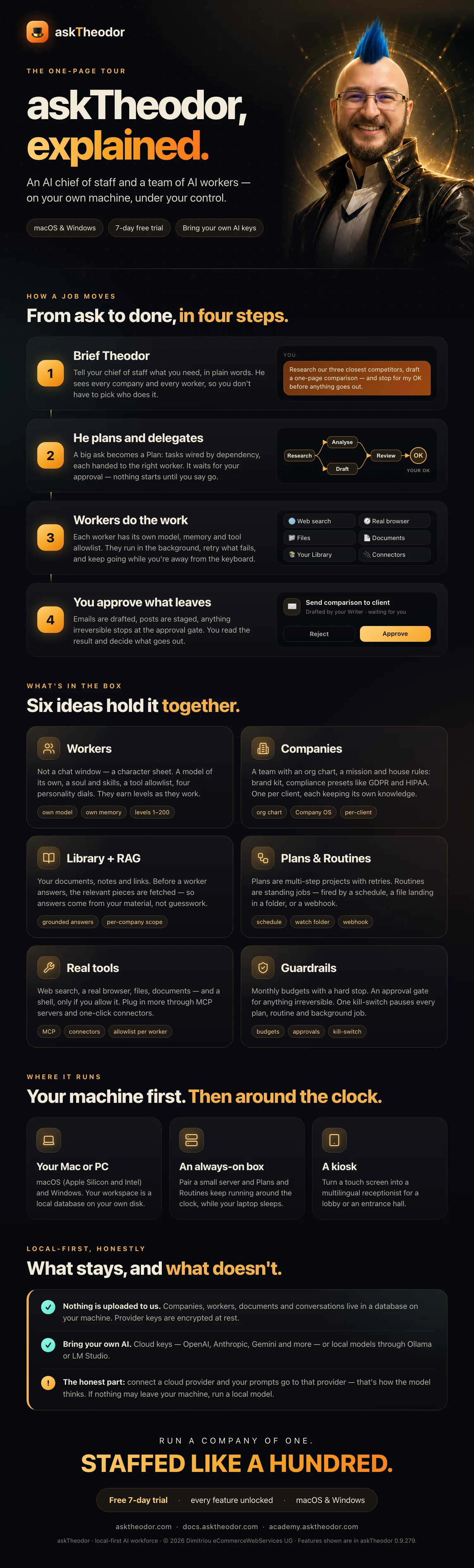
Click the image to open it full-size and read every label.
askTheodor runs on macOS and Windows, with a 7-day free trial. Your workers, your machine, your keys.