Every business has a task like this.
You copy the order number out of one app, paste it into another, check a date, type a reply, file the PDF. It takes eleven minutes. You do it four times a week. You could explain it to someone in two — except explaining it properly, writing down every step and every "but not when…", takes an afternoon nobody has.
So it never gets handed off. Not because it's hard, but because it's yours: the steps live in your hands, not on paper.
askTheodor 0.9.284 is built around that gap. It's called Automate, and it works in three steps.
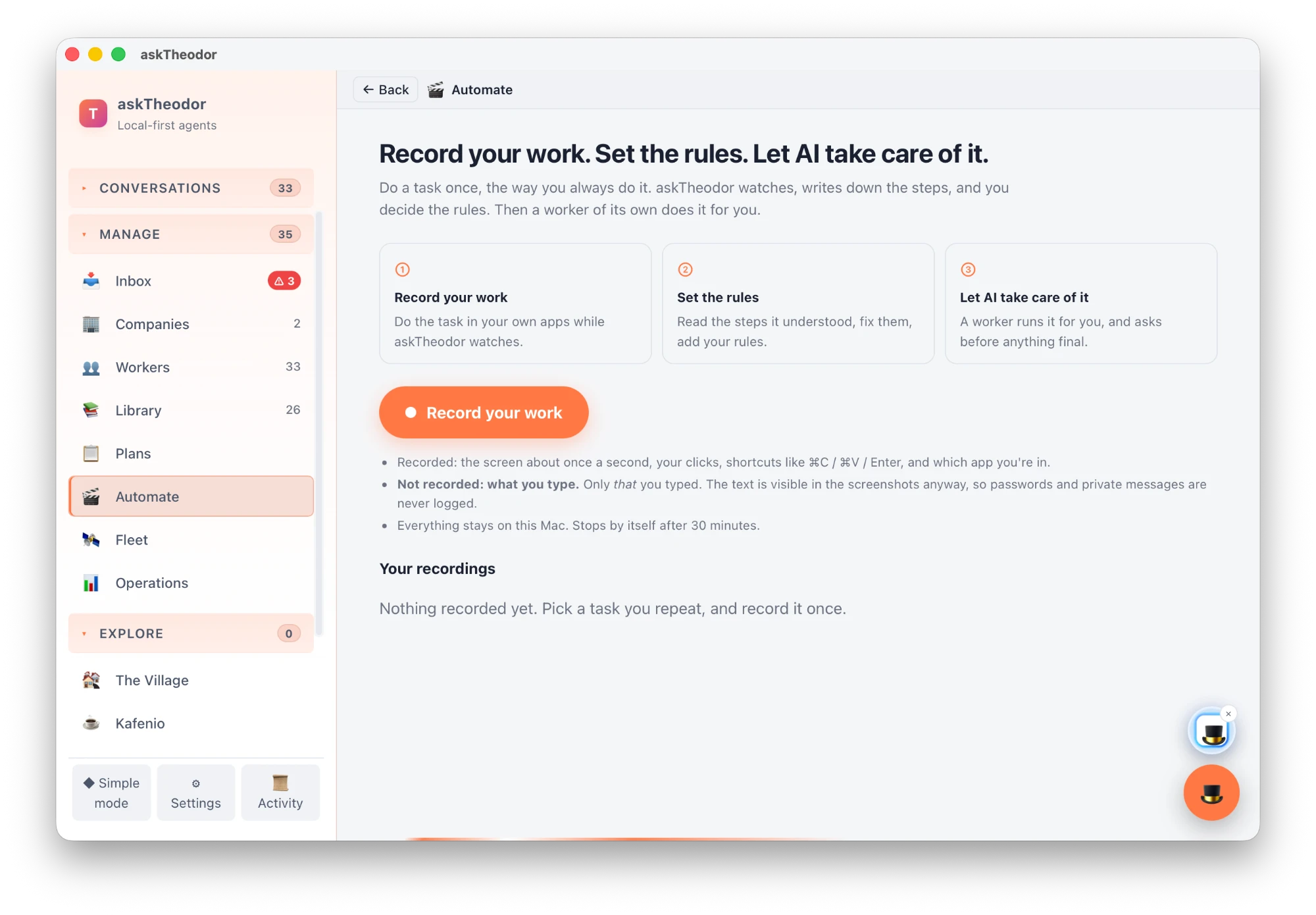
1. Record your work
Click Record your work, then just do the task — in your own apps, the way you always do it. askTheodor watches.
What it writes down:
- The screen, about once a second — and only when something actually changed, plus a frame on every click.
- Your clicks, and shortcuts like ⌘C, ⌘V and Enter.
- Which app you're in, and when you switch.
What it doesn't write down: what you type. The recorder logs only that you typed — "typed 14 keys" — never the characters themselves.
The recording lives in a private folder on your Mac. A ● REC item in the menu bar lets you pause or stop at any time, and recording stops on its own after 30 minutes, so a forgotten session can't run all afternoon. Delete a recording and it's gone.
2. Set the rules
When you stop, askTheodor turns the recording into a written procedure — the thing you never had time to write:
- Goal — what the task is for
- Apps used and the inputs it needs
- Steps, in order
- Rules observed — and it's told not to invent rules it didn't actually see
- Done when — how you know it's finished
- Safer ways to do the same thing, and questions for you where it wasn't sure
Then you read it, and you fix it. It's plain text, so editing is just editing. One click adds a Your rules section to fill in: Only do this for…, Never…, Ask me before…. That's where your judgement goes — the part no recording can capture.
You choose which model does the reading. Pick a local model and the screenshots never leave your Mac — free and private, though slower. Pick a cloud model and it's faster and sharper, but a selection of key screenshots (up to 24) goes to that provider to be read. Your call, per recording.
3. Let AI take care of it
Happy with the procedure? Turn it into a worker. askTheodor creates a new member of your workforce, named after the task, whose whole job description is your procedure and your rules.
When you tell it to go, it works the way you did: it looks at the screen, clicks, types and presses keys in your apps.
And it's built to be the most cautious colleague you have:
- Computer control is off until you switch it on. Nothing touches your mouse by default.
- Every click, keystroke and typed value asks for your approval — unless you deliberately choose Always allow for that worker.
- It's told to stop and ask before anything final — sending, paying, submitting, deleting.
- It can only use the screen. No shell, no file writes, no web requests on the side. It can do exactly what you could do with a mouse and keyboard, and nothing else.
- Throw the mouse into the top-left corner and it stops, instantly.
Why this matters
Most automation tools ask you to become a programmer: connect APIs, draw flowcharts, map fields. That works for the tasks big enough to justify it. It doesn't work for the eleven-minute job you do four times a week in three apps that don't talk to each other.
Automate starts from the other end. You already know how to do the task. You just do it once, and askTheodor does the writing-down, the remembering and — with your approval — the doing.
Where to start
- Update to 0.9.284 (Settings → 🔄 Updates).
- Open Automate in the sidebar. The first time, macOS will ask for Screen Recording and Accessibility permission — that's how the recorder sees the screen and your clicks.
- Pick a task you repeat — small, boring, and frequent is perfect — and record it once.
- Read the procedure, add one rule, and let the worker try it with approvals on.
Judge it on that one task. Eleven minutes, four times a week, is about three hours a month you get back.
Automate is new in askTheodor 0.9.284, on macOS first. Your recordings stay on your Mac; you decide which model reads them.